
Selecting the xFusion software stack by layer and version
Separate device management, fleet operations, operating systems and workloads, then align licences, support and integration acceptance.
1. Draw the layers and their owners
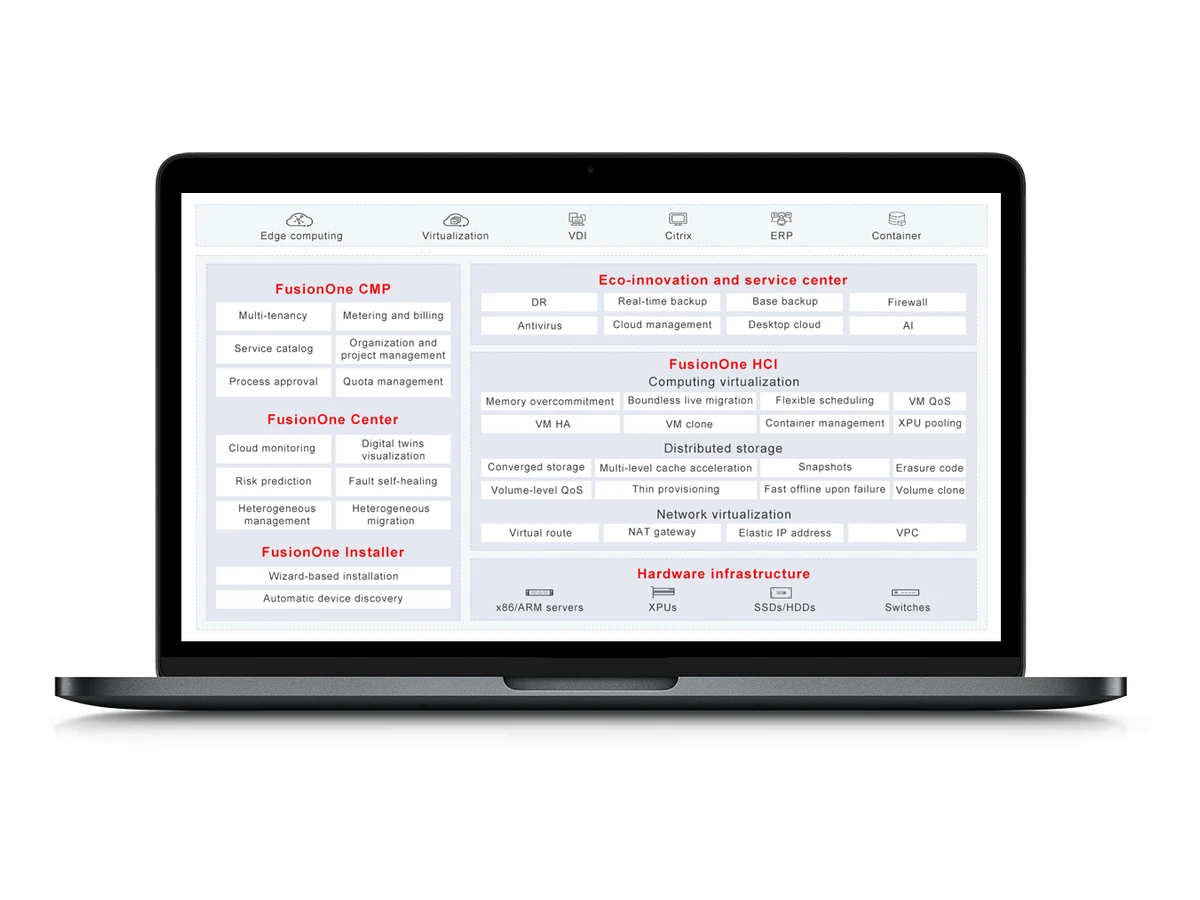
A server proposal can include firmware, device management, fleet tools, an operating system, virtualization and application software. These layers have different release cycles, licences and operational owners. Draw the stack before selecting product names, and mark the interfaces between it and the existing environment. Include identity, monitoring, backup and network dependencies. This helps expose a missing responsibility early: supplying a licence, installing it, migrating an application and operating the result are different deliverables, even when they appear within one infrastructure project or a single commercial proposal.
2. Distinguish iBMC from FusionDirector
iBMC handles out-of-band monitoring, diagnosis and control on supported servers. FusionDirector addresses centralized lifecycle operations across the selected fleet. FusionServer Tools, FusionOnline, FusionMobile and integration components serve more specific workflows. Identify the licence and usage rights for each required tool in the proposal. List the hardware models, iBMC firmware, management-platform version and required interfaces together. Test inventory, permissions, alarm routing and the upgrade workflow. Include a rollback window and an agreed escalation path so the operating team can take over a usable management environment after project handover.
3. Select a specific FusionOS release
FusionOS 23 is openEuler-based with Linux 5.10, while FusionOS 26 uses Linux 6.6 LTS. Select the release through application and driver compatibility checks. Record the exact OS build and update channel alongside storage, network and accelerator drivers. Verify application requirements, boot and recovery behavior, and any subscription term. FusionOS 22 reached EOM on 30 December 2025. For a system running that version, identify the target release, required feature changes and upgrade rights, then assess the transition against the application and data dependencies of the installed environment.
4. Match HCI, Storage or HPC to the architecture
FusionOne HCI combines compute and network virtualization, distributed storage and unified management in its architecture. FusionOne Compute and Storage are separately named offerings; the Storage datasheet describes block, file and object access. FusionOne HPC addresses a cluster with compute, interconnect, storage and management. Select the architecture by workload placement and data paths, then define cluster size, failure domains and recovery acceptance. Specify each component and its version in the proposal. Review existing storage, backup targets and network design before selecting a new platform as a replacement.
5. Separate licences, SnS and implementation
A commercial hypervisor or database requires its own licence and support scope. As of 7 November 2026, FusionOne for VMware EOM is scheduled for 31 December 2026; Oracle, HANA and Azure Stack HCI offerings passed EOM on 31 December 2025. EOM does not mean the same thing as EOS. Software Subscription and Support provides rights and assistance for the purchased period and scope; implementation of an upgrade can be a separate service. Regional enterprise-AI applications are an additional selection path, rather than software automatically bundled with every server or infrastructure platform.
6. Procure a testable stack
Prepare a version matrix with a named owner for every layer. Attach the licence bill, subscription dates, compatibility evidence and integration tasks to the proposal. The acceptance exercise should include application operation, monitoring, backup restoration and a controlled upgrade or rollback. Send SOFCONS the current stack, target workloads, capacity needs and migration window to define this scope. A technically coherent solution is one whose versions and responsibilities can be verified together, with handover documents that the operating team can use after commissioning and during a later change.
| Decision | Information to request | Acceptance |
|---|---|---|
| Versions | Firmware, OS, drivers and platform matrix | Supported combination for the application |
| Rights and support | Licence bill, SnS term and implementation scope | Named owner for updates and escalation |
| Integration | Identity, monitoring, backup and data paths | Application and recovery test |
Plan your IT infrastructure
Discuss server and platform selection for your applications, AI workloads and data center requirements.
Explore the technologies
- iBMC ↗
- FusionDirector ↗
- FusionOS 23 ↗
- FusionOS 26 ↗
- FusionOne HCI ↗
- FusionOne Storage ↗
- FusionOne HPC Cluster Solution ↗
- FusionOne for VMware ↗
- FusionOS 22 ↗
- Lifecycle notice · FusionOne for VMware ↗
- Lifecycle notice · FusionOS 22 ↗
- Software subscription and support terms ↗
- iBMC — technical document ↗
- FusionDirector — technical document ↗
- FusionOS 23 — technical document ↗
- FusionOS 26 — technical document ↗
- FusionOS 22 — technical document ↗
- FusionOne HCI — technical document ↗
- FusionOne Compute — technical document ↗
- FusionOne Storage — technical document ↗
- Lifecycle notice · FusionOne for Oracle, FusionOne for HANA, FusionOne for Azure Stack HCI ↗
Putting it into practice
Choosing an xFusion platform for local AI
Compare GB10, M495/M395, workstations and GPU servers through software fit, memory and a practical local-AI pilot.

Planning an xFusion refresh around exact lifecycle dates
Identify models and CPU variants, distinguish EOM from EOS, and build a staged migration for existing rack, blade and mission-critical systems.